


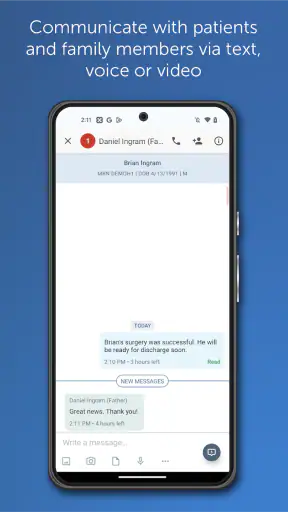
Healthcare communication is one of those tasks that looks simple until a message is delayed, misunderstood, or sent through the wrong channel. TigerConnect is built for that specific problem: it is a medical communication app from TigerConnect Inc that brings clinical conversations into a dedicated workspace rather than leaving staff to depend on ordinary texting, email, or scattered phone calls. I found its purpose easy to understand, but its usefulness depends heavily on whether your healthcare organization has already adopted it.
The app is free to install and has an Everyone content rating, which makes it approachable from a personal device. That does not mean it is a general-purpose messaging app for patients, families, or casual group chats. Its store summary describes it as a clinical communications solution for healthcare, and that distinction matters. In my view, TigerConnect is most convincing when it is part of an established hospital, clinic, or care-team workflow. On its own, it is not especially useful to someone who simply wants a private messenger.
How TigerConnect fits into clinical communication
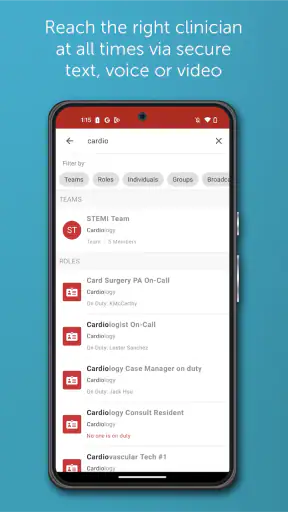
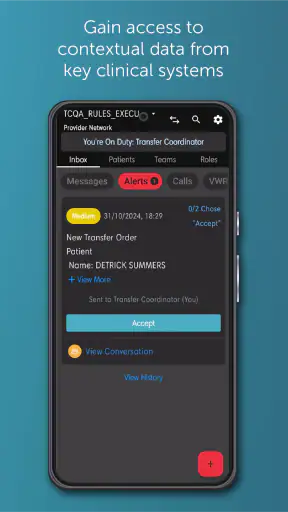
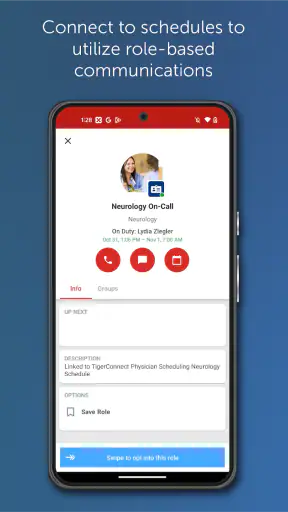
At its best, TigerConnect gives healthcare workers a clearer place to coordinate around patient care. A nurse may need to reach a physician, a physician may need to contact another department, and a care team may need to keep a conversation together while a situation changes. The value is not just sending a message. It is reducing the number of separate places where important clinical communication can happen.
That focus separates it from familiar alternatives such as standard SMS, consumer chat apps, and ordinary email. Those tools are easy to understand, but they were not designed around clinical communication. A normal text thread can become mixed with personal messages, an email chain can be overlooked, and a phone call may not leave the same shared context for everyone involved. TigerConnect is intended to give professional communication its own lane.
I would not treat the app as a replacement for every communication method in a medical setting. Urgent situations still require the escalation process defined by the organization, and a message-based tool should not encourage anyone to wait for a reply when immediate action is needed. The app is more useful for structured coordination, updates, questions, and handoffs than for assuming that every message will be seen instantly.
What the free download really means
TigerConnect is listed as free, so there is no purchase price to consider when deciding whether to install it. That is a practical advantage for staff who need the mobile app supplied by their workplace. It also lowers the barrier for trying the mobile experience on a compatible phone rather than relying only on a desktop or workstation.
Still, “free” should be read in context. The app is not valuable because anyone can download it and immediately create a private clinical network. Its usefulness comes from access to an organization’s communication environment. If your employer, clinic, or care team does not use TigerConnect, the free installation alone does not create the people, conversations, or workflow that make the service worthwhile.
I also see an important distinction between free access and free value. A clinician who already works in a TigerConnect-enabled organization may receive substantial value without paying for the app personally. A person outside such an organization may receive very little value despite paying nothing. That is why I would check with the relevant administrator or workplace before spending time setting it up.
The app has been available since July 14, 2010, and its current Android version is 9.12.81, with Android 8.0 or later required. Those details make it reasonably accessible for many existing devices, although anyone using an older Android phone should check compatibility before planning around it. The long availability also suggests that this is a mature product rather than a newly launched experiment, but age alone is not a guarantee that every organization will configure it in the same way.
A realistic shift scenario
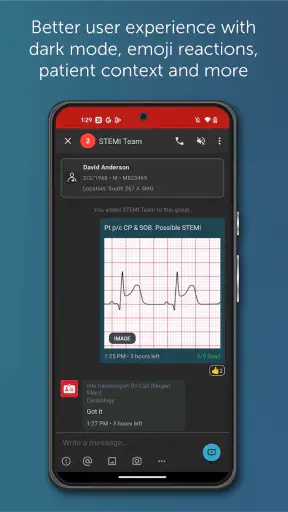
Imagine I am finishing a busy shift and need to pass along a change in a patient’s situation to the next clinician. With ordinary texting, I might be tempted to send the update to one person, then repeat it elsewhere when another team member asks. With email, the message could sit among less urgent correspondence. In a dedicated clinical communication environment, the sensible workflow is to keep the relevant conversation with the appropriate care group and make the update visible to the people who need it.
The benefit in that situation is not flashy. It is the reduction of fragmented communication. I can think about the message as part of a care-team conversation rather than as an isolated note in my personal phone. That can make handoffs easier to follow and reduce the temptation to use informal channels for professional matters.
There is also a trade-off. A shared clinical conversation can become noisy if too many people are included or if routine updates are not organized carefully. TigerConnect cannot decide who truly needs an update, how quickly they should respond, or when a message should become a phone call. Good communication habits remain essential.
Where the app can deliver real value
The strongest value is consistency. When a healthcare organization selects one communication platform, staff have a common destination for work-related conversations instead of improvising with whatever app happens to be on a phone. That consistency is especially useful for teams that work across departments or rotate through different shifts.
Another useful quality is separation. Keeping clinical communication apart from personal messaging makes it easier for me to maintain a boundary between work and private life. It can also make a conversation easier to locate later than a mixed personal thread. I would not assume that every message should be treated as a permanent medical record, but having a professional channel is still preferable to relying on informal apps.
TigerConnect may also help people who are frequently away from a desk. A mobile clinical communication app is a better fit for a nurse moving between rooms, a physician between departments, or a coordinator who cannot remain at a workstation. The advantage is practical rather than decorative: mobile access can reduce the delay between noticing an issue and notifying the right colleague.
For managers and administrators, the value is broader than convenience. A shared communication approach can make it easier to establish expectations about where work conversations belong. However, the app itself does not solve staffing problems, unclear responsibilities, or poor escalation procedures. It supports a workflow; it cannot replace one.
Small workflow choices that make a difference
One of the most important habits is choosing the smallest appropriate audience. If I send every update to a large group, the conversation may become difficult to follow and genuinely important messages may lose attention. A focused recipient list is more useful than treating the app like a public noticeboard.
I would also make the purpose of a message obvious at the beginning. A short update that identifies the patient-care context, the action needed, and the expected urgency is easier to process than a vague “Can you call me?” message. This is not a special feature of TigerConnect, but it is a specific way to get more value from a clinical communication tool.
A third insight is to use the app as part of a handoff routine rather than as a substitute for one. Before ending a shift, I would review active conversations, identify anything still waiting for a response, and communicate unresolved issues through the organization’s required process. A message that was sent is not necessarily a message that was understood or acted upon.
Finally, I would keep personal convenience separate from clinical appropriateness. It may be faster to copy a colleague into a broad conversation, but speed is not the only consideration. Relevance, privacy, accountability, and the organization’s rules should guide how the app is used.
What feels less convenient
The biggest limitation is that TigerConnect is not a standalone solution for everyone. A download does not automatically connect me with a hospital, practice, or care team. The app’s value is dependent on organizational adoption and account access, so a patient or independent professional may find the experience disappointing without that surrounding setup.
There is also a learning curve created by responsibility rather than by the basic idea of messaging. Healthcare users need to understand which conversations belong in the app, what should be escalated by another route, and how their workplace expects messages to be handled. A simple interface would not remove those obligations.
Notifications can create another balancing act. Too few alerts may cause a user to miss a time-sensitive update; too many can produce fatigue and encourage people to ignore the next one. I would treat notification settings as part of the workflow, not as a one-time preference. The right arrangement depends on role, shift pattern, and organizational policy.
Compared with ordinary SMS, TigerConnect may feel less immediate to someone who is used to messaging friends with no setup. Compared with email, it may feel more focused but less suitable for long formal documents or broad administrative communication. Compared with a phone call, it offers a written conversation but not the immediate back-and-forth that some situations require. Its strength is occupying the middle ground between scattered messaging and voice-only contact.
Who should use it
I would recommend TigerConnect to healthcare workers whose organization already uses it and expects staff to communicate through it. Nurses, physicians, coordinators, and other clinical team members can benefit from having a dedicated mobile channel for work conversations. It is also a sensible option for people who need to stay reachable while moving through a facility rather than sitting at a computer.
It may be particularly useful for teams that struggle with fragmented communication. If staff currently switch between personal texts, email, phone calls, and informal group chats, a common clinical platform can provide welcome structure. The improvement will be greatest when the organization also defines clear rules for urgency, response expectations, and appropriate recipients.
I would be more cautious for a small independent practitioner who needs only occasional one-to-one contact and has no existing TigerConnect network. A simpler approved communication method may be easier to maintain. I would also not choose it as a personal messaging app, a family communication tool, or a general patient chat service simply because it is free to install.
Patients should follow the communication method provided by their healthcare organization rather than assuming that downloading the app creates access to a clinician. The same applies to caregivers and family members: the right tool depends on whether the relevant care team has invited them into an appropriate workflow.
How the app compares with everyday alternatives
SMS wins on familiarity. Almost everyone understands it, and it does not require a new workplace habit. But personal texting can blur professional boundaries and make it harder to keep work communication separate. TigerConnect is preferable when the organization wants clinical conversations in a dedicated environment rather than scattered across individual phones.
Email is better for lengthy explanations, attachments, and communication that does not require quick conversational exchange. Its weakness is attention: a time-sensitive clinical update can sit beside newsletters, administrative messages, and unrelated correspondence. TigerConnect is more appropriate when the conversation needs to remain connected to an active care-team workflow.
Phone calls remain the better choice when tone, immediate clarification, or urgent escalation matters most. A message can be efficient, but it can also be misunderstood or left unanswered. I see TigerConnect as complementary to calling, not as permission to replace every call with text.
Consumer chat apps may feel smoother for informal groups, yet their convenience does not make them suitable for every healthcare setting. A professional clinical communication app offers a more intentional boundary. The trade-off is that it requires organizational participation and disciplined use, whereas a consumer app can be started instantly by almost anyone.
Reach, maturity, and day-to-day expectations
TigerConnect has passed one million installs, with an average rating of 3.2 from around five thousand ratings and roughly one thousand reviews. Those figures show that the app has meaningful reach, but they also suggest that the experience is not universally smooth. I would not use the rating alone to judge its value because healthcare communication apps are often evaluated through the lens of account setup, organization configuration, notifications, and workplace expectations.
The developer is TigerConnect Inc, and the app remains in the medical category. Its Everyone rating makes the download broadly accessible, but the professional context is more important than the age label. A young person can technically encounter the app, yet the intended use is clinical communication within an appropriate organization.
When deciding whether to install it, I would ask three practical questions first: Does my organization use TigerConnect? Do I have the required account or invitation? What does my workplace expect me to do when a message is urgent or unanswered? The answers will tell me more about likely value than the free price or the public rating.
My final recommendation
TigerConnect is worth using when it is already part of your healthcare team’s communication system. In that setting, the free mobile access can make work conversations easier to keep together, especially for staff who move around during a shift. Its best contribution is structure: a professional channel that sits between informal texting, slower email, and voice calls.
I would skip it if I am looking for a general messenger, if my workplace does not support it, or if I need a tool that works independently without organizational setup. I would also avoid treating it as an emergency response system unless the healthcare organization explicitly defines it that way. The app can support good clinical communication, but it cannot create good policy or guarantee that every message receives immediate attention.
Overall, I see TigerConnect as a practical workplace tool rather than a consumer app. Its free access is meaningful for participating healthcare staff, while its value is limited for everyone else. If your organization has adopted it and provides clear guidance, I would recommend giving it a fair trial on Android 8.0 or later. If not, installing it alone is unlikely to change how you communicate.


